 Branding
 Digital Marketing
 Web & App Dev
 IT Services
Shadow AI: How to Turn Unapproved AI Use from Risk into Advantage
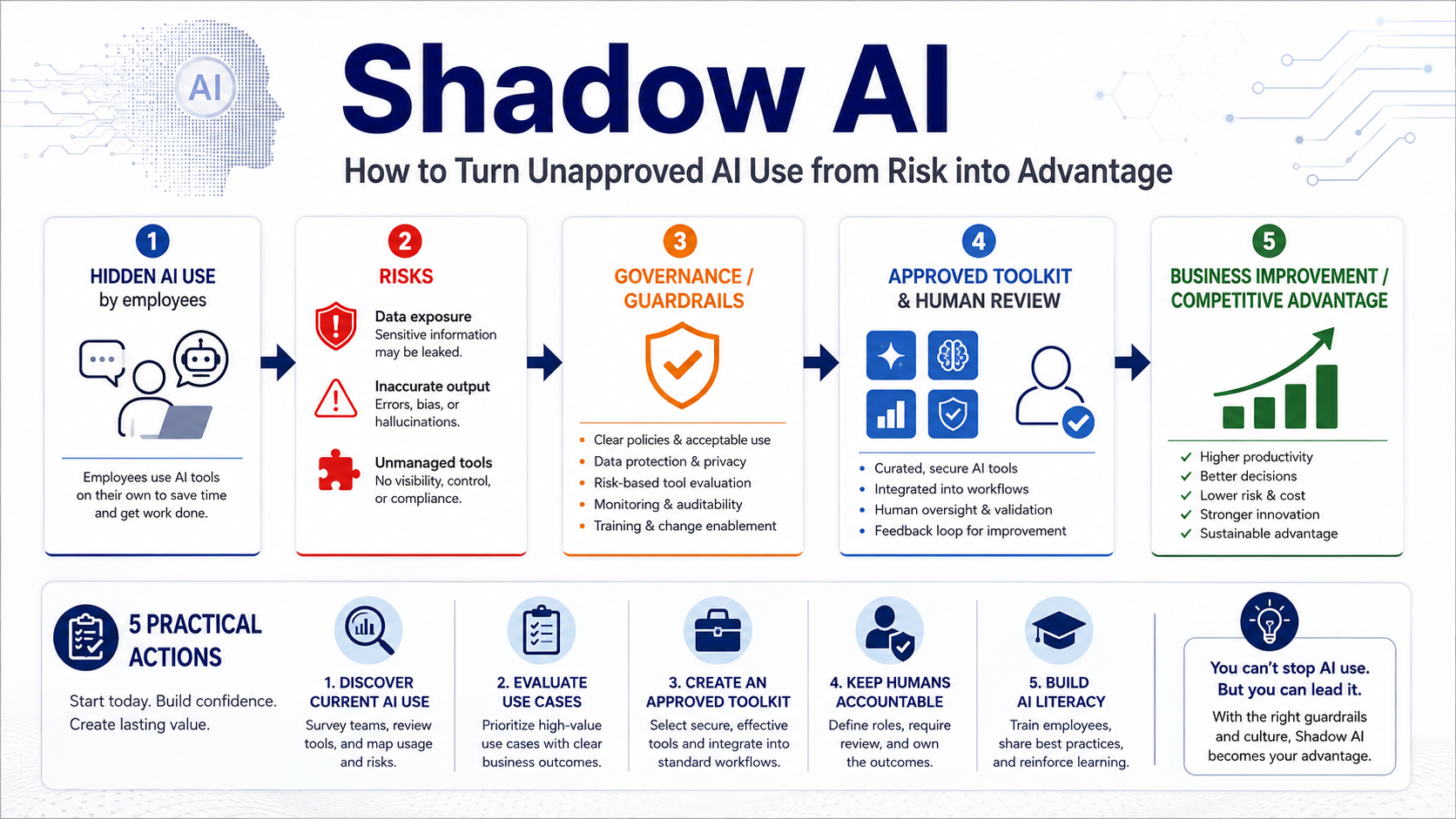
Employees are already using AI at work, whether you know it or not. They are drafting emails with ChatGPT, summarizing documents, creating images, analyzing spreadsheets, building small automations, and testing new tools that promise to save time. In many cases, they are doing this before the company has formally approved the platform, reviewed its privacy terms, or decided how AI should be used.
This is the new form of shadow IT: shadow AI.
Like traditional shadow IT, shadow AI is often treated primarily as a security problem. That concern is justified. Employees may paste confidential information into public tools, create business content without proper review, or rely on systems that no one has assessed for accuracy, privacy, or compliance.
But just like shadow IT, shadow AI also tells you something important: your employees are looking for better ways to work.
Handled poorly, it creates hidden risk. Handled well, it can reveal where your business is ready for automation, where existing processes are frustrating employees, and where AI could create a real competitive advantage.
Why Employees Use Unapproved AI Tools
Just like unauthorized SaaS tools of yesteryear, most employees use unauthorized AI tools because are accessible, fast, and useful:
For example:
- An employee may be facing a blank page and use AI to create a first draft.
- A salesperson may summarize a long email thread before a meeting.
- A marketing team may test an image generator because the formal creative process takes several days.
- An operations manager may build a small automation because a repetitive task is wasting hours every week.
In many cases, shadow AI appears because the official process is slower or more difficult than the alternative, and can be used as a signal about unmet needs, process bottlenecks, and gaps in organizational guidance.
The Risks Are Real
AI tools introduce risks that are broader than those associated with a typical unapproved software subscription. From our observations, there are two biggest risks:
- The most immediate concern is data exposure. Employees may enter customer information, financial data, internal plans, source code, contracts, or personal information into a public AI platform without understanding how that information is stored or used.
- There is also the risk of inaccurate output. AI can generate confident answers that are incomplete, misleading, or entirely wrong. When employees use those answers without checking them, errors can reach customers, influence decisions, or become part of official company materials.
Other risks include:
- Copyright or intellectual-property concerns
- Inconsistent messaging across departments
- Unapproved automations changing data or triggering actions
- Employees creating unofficial AI workflows that only one person understands
- New subscriptions and tools adding cost without oversight
If we were to summarize the above, it would be: “the company may not know which tools are being used, what information is entering them, or how much business activity now depends on them.”
Banning AI Usually Pushes It Underground
A complete ban may appear to be the safest response, but it is rarely practical. AI features are now appearing inside software employees already use, including productivity suites, CRMs, design platforms, search engines, meeting tools, and customer-service systems. Even when a company blocks one platform, employees can often access another from a personal account or device.
A strict ban can therefore create the illusion of control while making real usage harder to see.
It can also discourage employees from sharing useful experiments. Someone who discovers a way to reduce a four-hour task to 30 minutes may keep it quiet if they believe the response will be disciplinary. This is actually a very common practice we observed in various Reddit communities and even today with some clients: Employees may use AI in older industries to perform the work, “pocket their time differences”, and not report it upwards because they want management to think the output are from their own time and creation. (This gap is definitely closing though!)
A better approach is to create clear guardrails. Employees need to know which tools are approved, which information is off-limits, when human review is required, and how they can propose new use cases. This way, there can be visible, responsible experimentation.
Tip #1: Start by Understanding What People Are Already Doing
Before creating a detailed AI policy, find out how employees are using AI today. Even a short survey, a few team interviews, or an internal workshop can reveal a great deal.
Ask employees which tools they use, what tasks they use them for, and what problems they are trying to solve. Make it clear that the purpose is to understand the opportunity and manage risk, not to punish people for experimenting.
You may discover that employees are using AI to:
- Draft and edit business communications
- Summarize meetings and documents
- Research customers or competitors
- Generate marketing content
- Create reports or spreadsheet formulas
- Translate materials
- Write or review code
- Analyze support tickets
- Build small automations
- Develop proposals and presentations
These activities provide a practical starting point for governance. They also help identify the areas where AI may deliver the greatest value.
Tip #2: Evaluate the Use Case, Not Just the Tool
Not every use of AI carries the same level of risk. Using AI to perform competitive analysis is very different from uploading a confidential customer agreement for analysis. Creating a first draft of an internal announcement is different from allowing an AI agent to update financial records or contact customers automatically.
A useful governance model evaluates both the tool and the activity.
- Low-risk uses may include brainstorming, rewriting non-sensitive text, creating generic outlines, or summarizing public information.
- Moderate-risk uses may involve internal documents, customer communications, analysis, or content that could affect the company’s reputation.
- High-risk uses include sensitive personal information, financial decisions, legal advice, regulated data, confidential intellectual property, or automations that can take actions without human approval.
This allows the company to apply stricter controls where they matter most without making every AI experiment go through the same approval process.
Tip #3: Create a Small Approved AI Toolkit
Employees are more likely to follow policy when the approved option is easy to use. Rather than publishing a long list of prohibited platforms, select a small set of tools that meet the organization’s security, privacy, and business requirements. Where possible, use business or enterprise accounts that offer stronger administrative controls and clearer data protections. (For example, the enterprise accounts of ChatGPT and Claude can save employee prompts)
The toolkit might include:
- An approved general-purpose AI assistant
- AI features within Microsoft 365 or Google Workspace
- A secure meeting transcription and summarization tool
- An approved design or image-generation platform
- A controlled automation platform
- Department-specific tools for development, sales, or customer service
Note: Approval should not imply that every output is automatically trustworthy. Employees still need guidance on verification, review, and appropriate use. The goal is to give people a safe default rather than expecting them to research privacy terms and security settings on their own.
Tip #4: Turn Employee Experiments into Business Improvements
At least some of the most useful AI opportunities will come from employees who understand the daily friction in their own work. For example:
- A customer-service employee may discover that AI can categorize incoming requests.
- A project manager may find a faster way to turn meeting notes into action items.
- A finance employee may create a workflow that checks reports for missing information.
When an experiment shows promise, the company can bring it into the open, assess the risks, document the workflow, improve the prompts, connect it to approved systems, and measure the result. This turns an individual workaround into an organizational capability.
Tip #5: Keep Humans Accountable for the Outcome
Let AI assist with work, but keep the responsibility will people. Employees should understand that they remain accountable for the accuracy, quality, legality, and appropriateness of anything they submit or publish. AI-generated work should be reviewed with the same care as work produced by an employee, contractor, or outside vendor.
This is especially important for customer-facing communication, strategic recommendations, financial analysis, technical changes, and regulated activities.
Instead of having the human review as a ceremonial final step, make sure the reviewer needs enough knowledge and authority to identify errors and challenge the output.
As AI agents become capable of taking actions rather than merely producing text, approval controls become even more important. An agent that can send emails, update a CRM, change a website, or move data between systems should have clearly defined permissions, limits, and monitoring.
Tip #6: Build AI Literacy, Not Just AI Policy
A policy can define acceptable use, but employees also need practical judgment. Training should show employees how to recognize sensitive data, verify AI-generated claims, identify weak or biased output, and decide when AI is not appropriate. It should also explain why certain restrictions exist.
People are more likely to follow rules when they understand the consequences. (Training can be simple and practical.) Show examples of safe and unsafe prompts. Explain which information should never be entered into a public tool. Demonstrate how confident-sounding errors can appear. Clarify when work must be reviewed by a manager, subject-matter expert, or legal adviser.
AI literacy should also include the ability to recognize good use cases. Employees should learn to ask whether AI genuinely improves the process or merely produces more content, more complexity, or more work to review.
Tip #7: Governance Should Make Innovation Easier
Good AI governance should also provide a clear path for experimentation.
Employees should know how to request access to a tool, propose a use case, and test an idea safely. Small experiments can be reviewed quickly, while higher-risk projects receive more formal assessment.
This creates a healthier relationship between business teams and IT. Employees are more likely to disclose what they are trying when they believe the response will be constructive.
It also gives leadership better visibility into where AI is creating value. Over time, recurring use cases can become part of a more deliberate AI roadmap.
Where FlexHours Fits In
Shadow AI is not going away. The tools are becoming easier to access, more capable, and more deeply embedded in everyday software.
The organizations that respond best will be the ones that create enough trust and structure for employees to bring those experiments into the open. That means listening to why people are using AI, addressing the risks that matter, approving tools that meet real needs, and turning promising experiments into reliable business processes. Your employees are already showing you where AI could improve the business.
Many organizations understand that AI governance is necessary but do not have a dedicated AI team. The responsibility may be spread across IT, cybersecurity, operations, legal, marketing, and senior leadership, with no one having enough time to coordinate the work.
Smartt’s FlexHours model gives businesses access to the different skills required to manage AI responsibly.
FlexHours can be allocated toward:
- Discovering current AI use across the organization
- Developing practical AI policies and guidelines
- Reviewing tools for privacy, security, and business fit
- Establishing an approved AI toolkit
- Identifying high-value automation opportunities
- Designing and testing AI workflows
- Integrating AI with existing systems
- Training employees and managers
- Creating approval and human-review processes
- Monitoring and improving AI use over time
Because AI touches technology, security, process, marketing, data, and employee behaviour, it rarely fits neatly inside a traditional IT ticket or one-time consulting project. Smartt's FlexHours provides a way to address these needs as they evolve. Let’s have a conversation if you’re interested!