 Branding
 Digital Marketing
 Web & App Dev
 IT Services
Do You Really Need an AI PC?
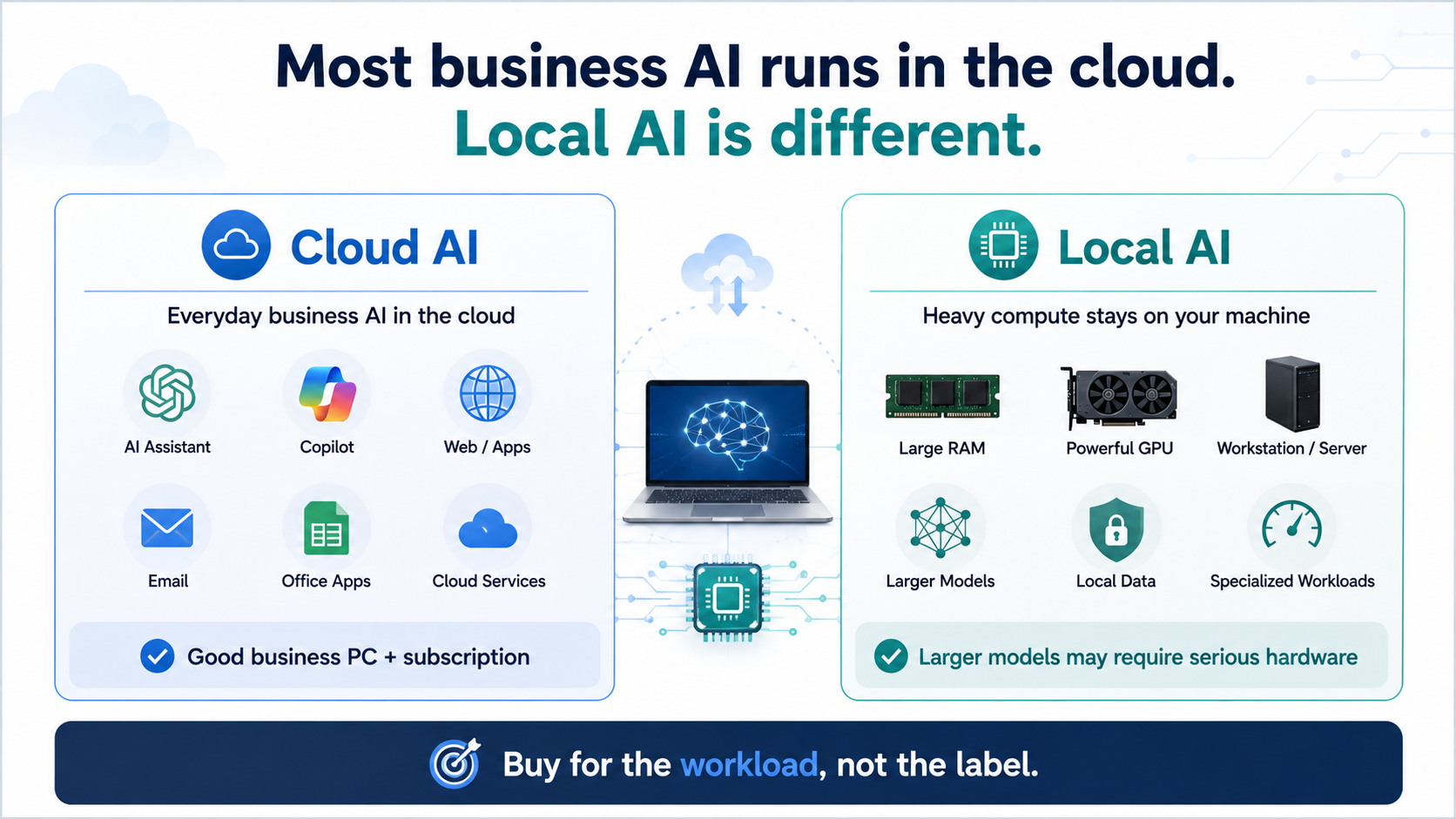
If you have looked at computers lately, you have probably noticed that almost everything is becoming an “AI PC.”
Intel has AI processors. AMD has AI processors. Microsoft has Copilot+ PCs. Even the new Mac minis announced by Apple tout significantly improved AI performance. Manufacturers are promoting NPUs, TOPS and all kinds of new specifications that most people had never heard of a few years ago.
So does that mean your next round of business computers should all be AI PCs? Not necessarily. (Chances are, the answer is “NO” in most cases.)
The better question is what kind of AI your employees are actually using, and where that processing is happening.
Most Business AI Doesn't Need Much Local Computing Power
If someone is using ChatGPT, Microsoft Copilot or another cloud-based AI service, most of the actual processing is happening somewhere else.
That means someone can use AI heavily throughout the day without needing an unusually powerful computer. An employee who spends most of the day in Outlook, Teams, Microsoft 365, a CRM and a browser does not suddenly need a high-end GPU or huge amounts of memory just because ChatGPT has become part of their workflow. All they really need is access to the service.
This is probably the most important distinction when buying hardware today: using AI is not the same thing as running AI locally.
Note: Newer AI PCs include hardware such as NPUs that can process certain AI functions directly on the computer. That is becoming more useful as Windows and business applications add things like transcription, image processing, translation, audio enhancement and other local AI features.
But for many employees, those capabilities are still secondary to the things that have always mattered: enough memory, enough storage, good battery life, reliability and sufficient performance for their normal applications.
In other words, don't buy an underpowered computer just because it has impressive AI specifications.
Local AI Is Where Hardware Requirements Get Interesting
The calculation changes when a company actually wants to run AI models locally.
This is more than just transcribing meetings or translating documents. We are talking about running local models that can perform some of the same kinds of tasks as Claude or ChatGPT.
There can be good reasons to do this. A business may want more control over its data, less dependence on outside AI services, faster processing for certain applications, or the ability to develop customized AI tools.
This type of local AI can also require substantially more computing power, and this is where the cost can become significant.
Depending on the workload, system memory, GPU memory and GPU performance can become particularly important. While smaller AI models can run on relatively modest hardware, a genuinely useful business AI workstation capable of running larger models locally may need hundreds of gigabytes of memory.
Once you configure that level of hardware, $20,000+ for a machine is entirely realistic.
And that is why simply looking for an AI PC label is STILL not particularly useful if local AI is the goal.
A relatively small model may run perfectly well on a modern laptop. More demanding AI development, larger models or GPU-intensive processing may require a high-performance workstation, server or even shared computing resources instead.
And if only a few employees need that capability, it may make more sense to give them access to a shared system rather than putting expensive hardware on every desk.
So Should You Buy AI PCs?
Here’s our opinion:
1) If your existing computers are working well, we would not replace them simply because they were purchased before the term “AI PC” became popular. They can still use cloud AI tools, which is where most businesses are getting value from AI today.
2) If you are replacing computers anyway, buying newer hardware with dedicated AI acceleration can make sense, particularly if the price difference is relatively small.
Business computers often stay in service for four or five years, and AI features built into Windows and everyday business applications are likely to become much more common during that time. So an NPU or other AI-specific hardware may improve the useful life of a new machine even if an employee does not need it immediately.
This should be the icing on the cake and NOT the whole decision.
A useful way to think about it is:
Normal Business Users
Buy a good business computer with appropriate memory, storage, battery life and performance. AI capability is a bonus, not necessarily the reason to buy it.
Computers Already Due for Replacement
Buying modern AI-capable hardware may make sense if the additional cost is reasonable, particularly when you expect to keep the computer for several years.
Local AI / AI Development
Treat this as a specialized workload. Determine what models and applications will actually run locally, and then choose the memory, GPU and other hardware around those requirements.
For serious business use, these systems can become very expensive very quickly. Once you need enough memory to run larger models properly, $20,000+ for a workstation is entirely realistic.
That is another reason we would not recommend buying this kind of hardware for everyone. In many cases, it makes far more sense to build one or two powerful systems and share those computing resources with the people who actually need them.
Where FlexHours Fits
Through FlexHours, we can help you review how your employees actually use their computers, identify where newer AI-capable hardware makes sense, and determine where existing systems, upgrades or shared computing resources may be a better option.
And when new equipment does make sense, as a FlexHours client, you can apply your Hardware Credit toward eligible purchases.
Not sure whether your next computers really need to be AI PCs? Talk to us and we can help you figure out what makes sense.